Building llama.cpp with CUDA on Windows 11
A record of building llama.cpp, the go-to local LLM inference engine, from source on Windows 11 with the CUDA backend enabled for an NVIDIA GPU, through to actually running a model.
A record of building llama.cpp, the go-to local LLM inference engine, from source on Windows 11 with the CUDA backend enabled for an NVIDIA GPU, through to actually running a model.
Following the previous post, I set up an SSH X11 forwarding environment and xeyes displayed fine on the Windows side. But nautilus simply refused to launch. This is a record of tracking down why this one app kept crashing even though DISPLAY was clearly working.
The Fedora 43 Server had neither an X server nor a desktop environment installed. From there, GUI apps needed to be displayed on a Windows machine. This is a record of setting up SSH X11 forwarding to forward only individual apps, without installing a desktop environment.
This post summarizes the steps for setting up an environment to produce a PDF from document.tex (using the ltjsarticle class, which assumes LuaTeX-ja) with LuaLaTeX. It assumes Windows + winget.
I ran into a case where trying to reach a Fedora Server machine on the same LAN via myhost.local (mDNS) failed name resolution only. By capturing packets directly with tcpdump, I traced the cause to firewalld blocking inbound mDNS traffic.
In June 2026, Microsoft officially released Coreutils for Windows.
winget install Microsoft.Coreutils
The Microsoft.Coreutils package installed with this command is an official Microsoft project that enables UNIX-style commands commonly used on Linux and macOS—such as ls, cp, rm, and cat—to run natively on Windows.
This article summarizes the project overview, supported commands, limitations, and differences from WSL and PowerShell.
Microsoft.Coreutils is a set of command-line tools for Windows maintained by Microsoft.
Internally, it is built on:
and implemented in Rust.
Microsoft describes the project’s goal as:
reducing friction for developers who move between Linux, macOS, WSL, containers, and Windows
It can be installed easily from WinGet.
winget install Microsoft.Coreutils
WinGet is the package manager built into Windows, and it can automatically download and install the specified package.
After installation, it can be used as ordinary commands.
ls
cat file.txt
grep keyword log.txt
cp source.txt backup.txt
Representative commands are as follows.
| Category | Example Commands |
|---|---|
| File listing | ls |
| File copy | cp |
| File move | mv |
| File deletion | rm |
| Display contents | cat |
| Working directory | pwd |
| Create directory | mkdir |
| Sleep | sleep |
| Pipe processing | tee |
| Search | grep, find |
If you are a Linux user, you can use familiar commands as they are.
This is the biggest point of caution!
PowerShell already has aliases and built-in commands with the same names.
Examples:
| Command | Issue |
|---|---|
| ls | Conflicts with a PowerShell alias |
| cp | Conflicts with Copy-Item |
| cat | Conflicts with Get-Content |
| rm | Conflicts with Remove-Item |
| pwd | Conflicts with Get-Location |
Therefore, even if you run:
ls
it does not necessarily invoke the Coreutils version.
Microsoft recommends using PowerShell 7.4 or later.
Although it aims for Linux compatibility, there are limitations due to Windows internals.
Linux’s mechanisms for:
kill
SIGTERM
SIGKILL
do not exist on Windows.
Therefore,
kill
timeout
are not provided at this time.
Linux:
grep error log.txt > /dev/null
Windows:
grep error log.txt > NUL
will be used instead.
Windows uses ACL-based permission management.
Therefore, commands such as:
chmod
chown
chgrp
are not provided.
Reading is possible, but creating new ones requires:
Microsoft intentionally excludes some commands.
A common comparison is with WSL (Windows Subsystem for Linux).
| Item | Microsoft.Coreutils | WSL |
|---|---|---|
| Installation cost | Very low | Requires setting up a Linux environment |
| Startup speed | Native | Has a virtualized layer |
| Linux compatibility | Partial | Very high |
| Bash environment | None | Available |
| apt usage | Not possible | Possible |
| Shell script compatibility | Limited | High |
WSL is “Linux itself,” whereas Coreutils is “a toolset for using Linux-style commands on Windows.”
Select "Named pipe" and set the pipe name to "COM1".
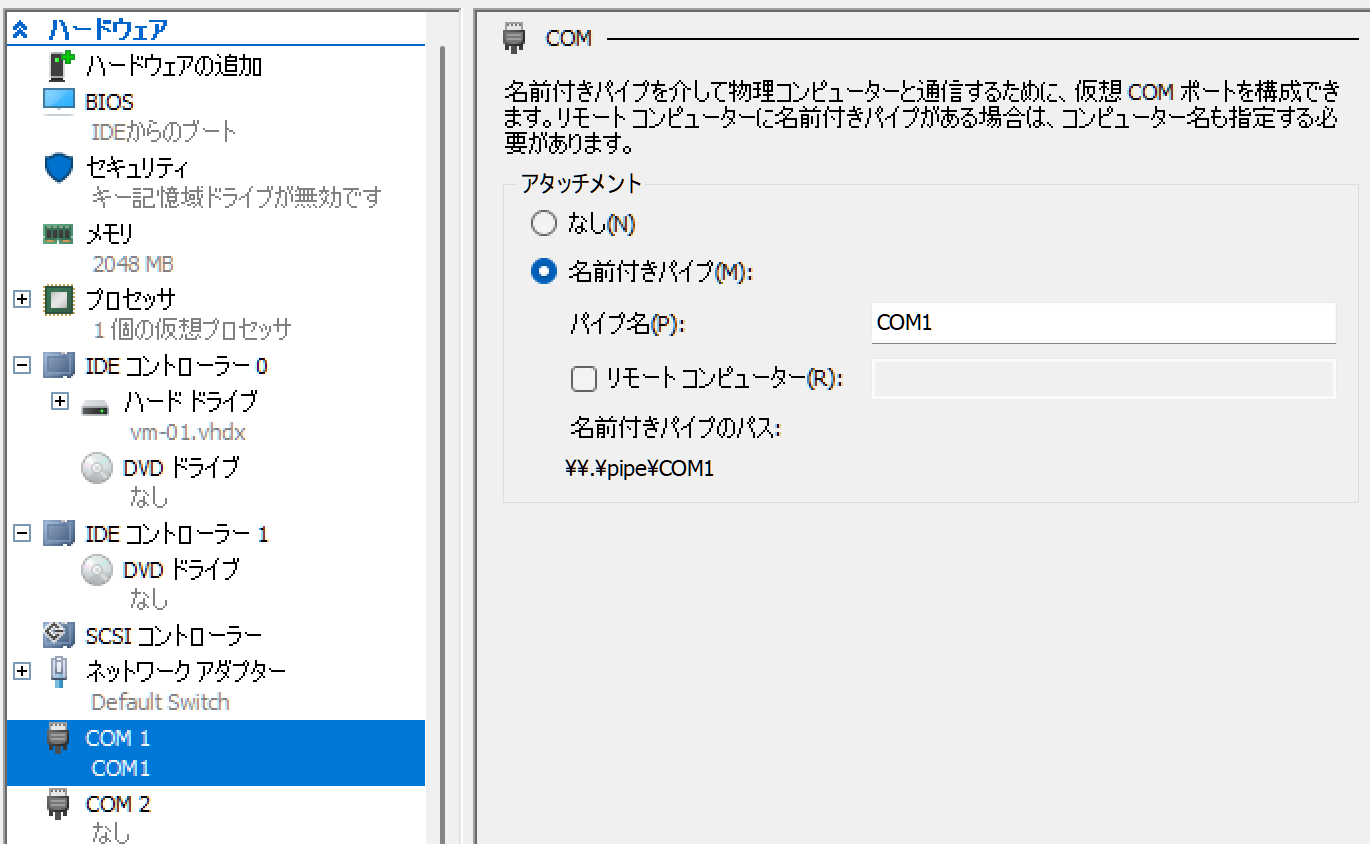
Open the GRUB configuration file with sudo nano /etc/default/grub.
GRUB_CMDLINE_LINUX_DEFAULT="quiet splash console=ttyS0,115200n8"
After saving, apply the GRUB settings with:
sudo update-grub
Configure the service to allow login via the serial port.
sudo systemctl enable [email protected]
sudo systemctl start [email protected]
Launch as administrator.
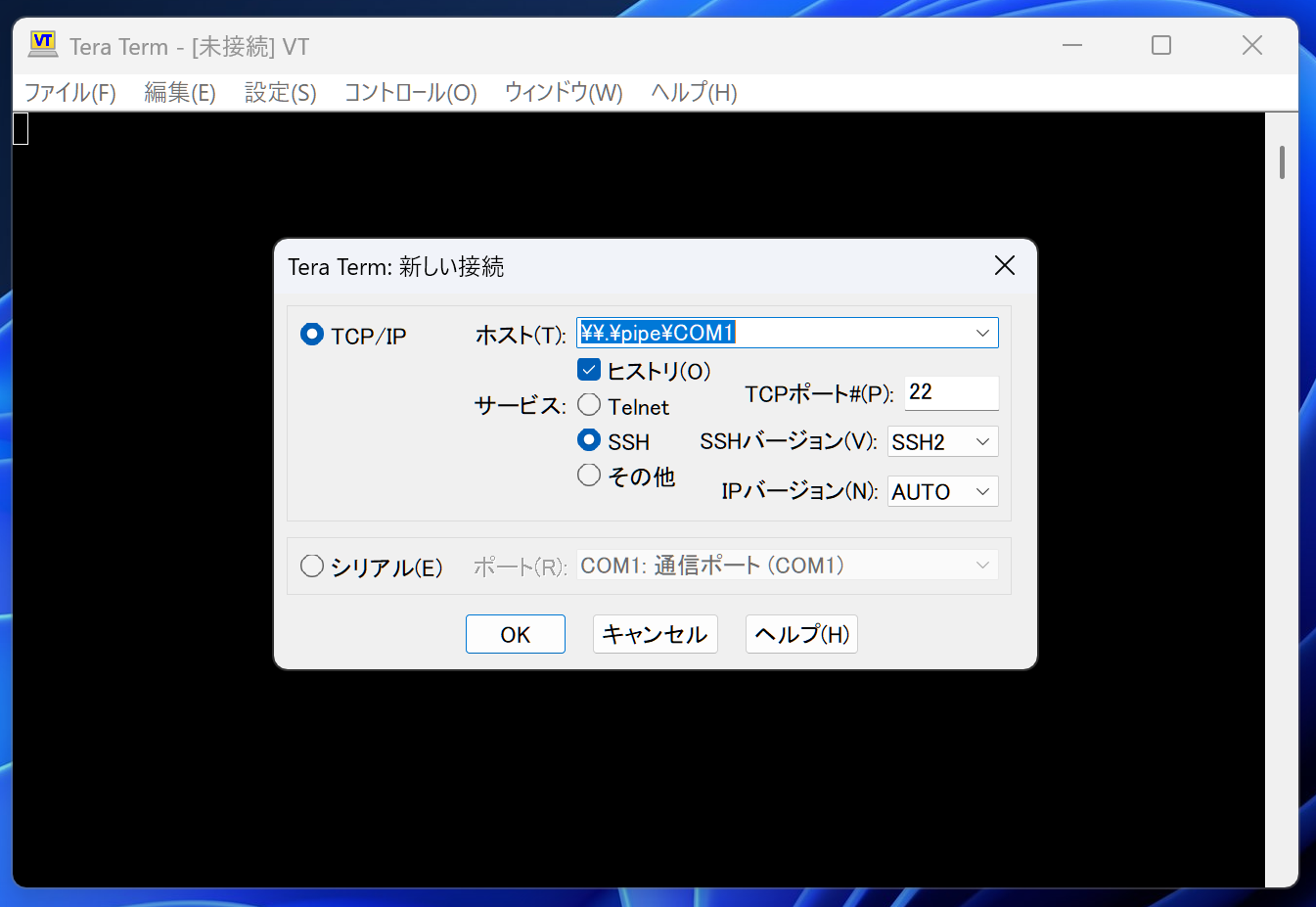
Launch as administrator.
| Serial line | Speed | Connection type: |
|---|---|---|
| \.\pipe\COM1 | 115200 | Serial |
Set the above.
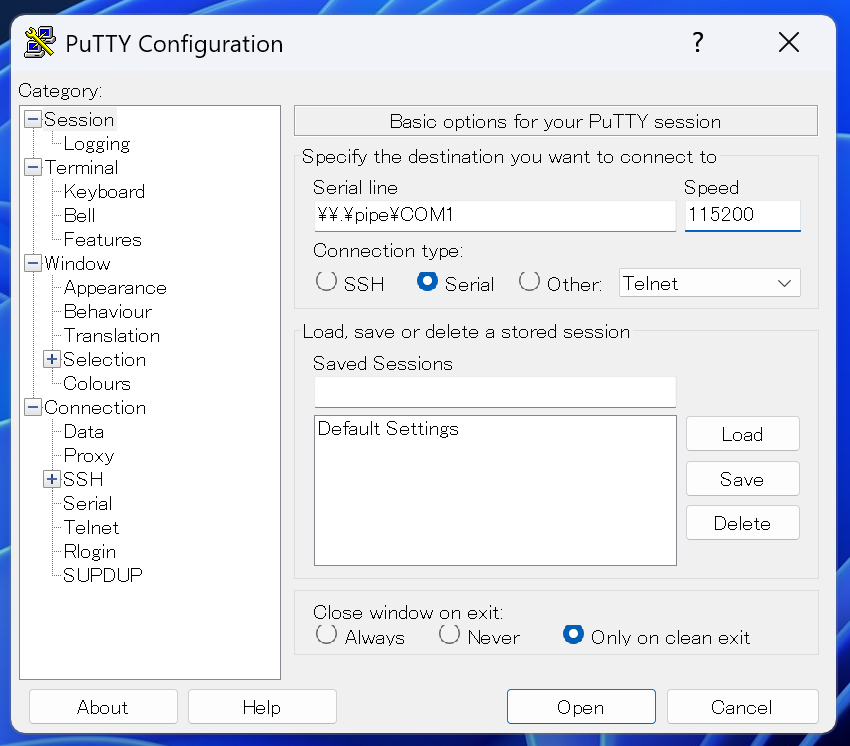
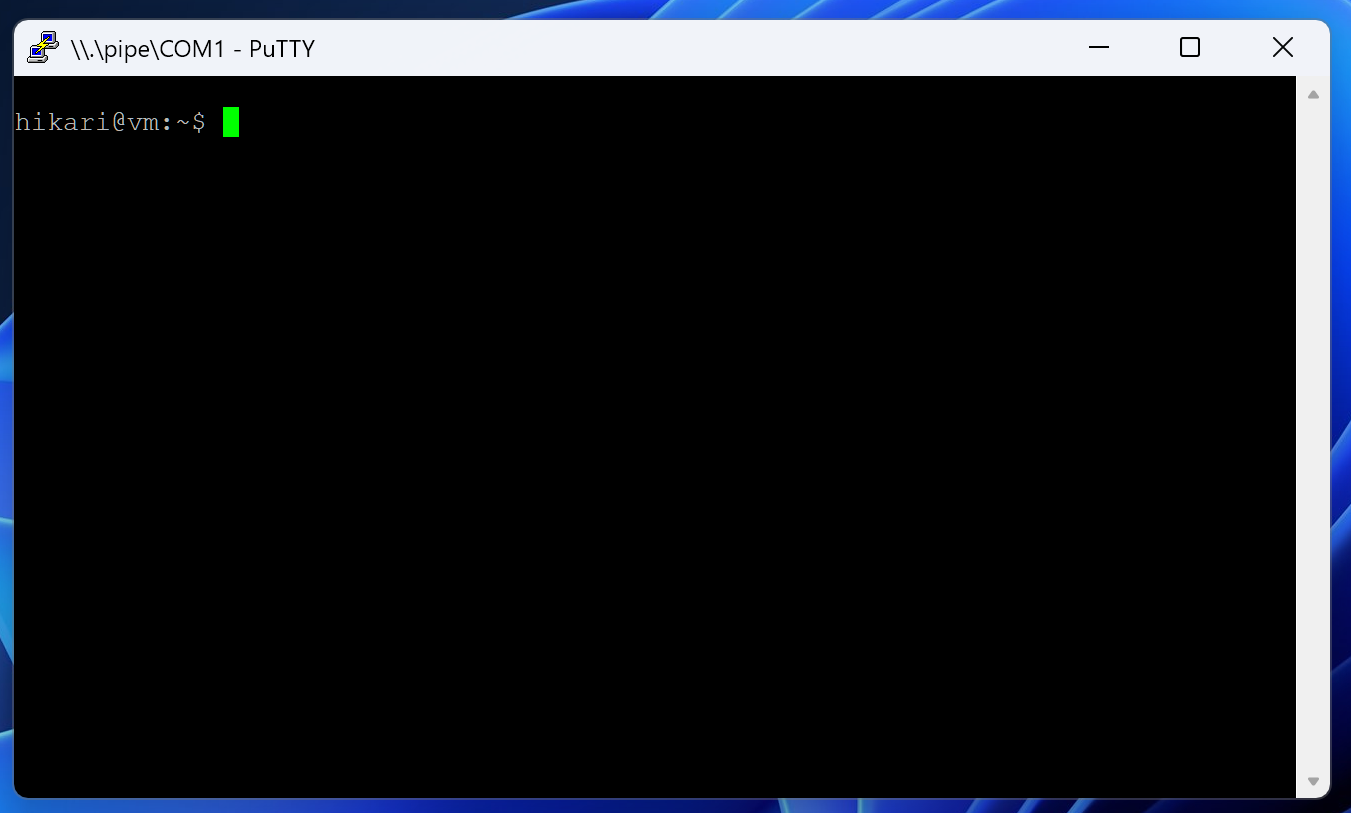
Launch as administrator.
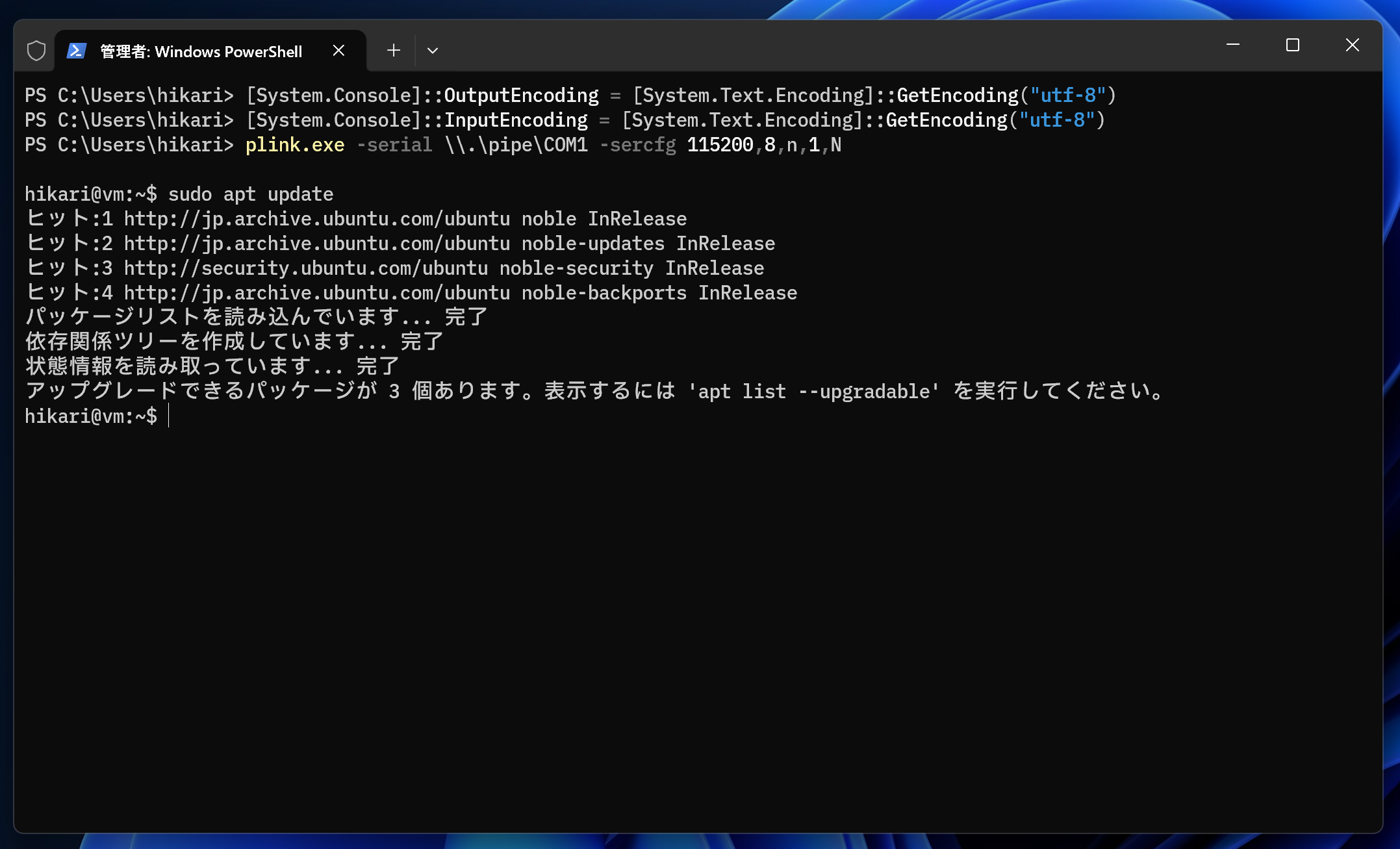
[System.Console]::OutputEncoding = [System.Text.Encoding]::GetEncoding("utf-8")
[System.Console]::InputEncoding = [System.Text.Encoding]::GetEncoding("utf-8")
plink.exe -serial \\.\pipe\COM1 -sercfg 115200,8,n,1,N
Exit with Ctrl + C.