跳至主要內容

使用高斯濾波器進行降噪(Python / Scipy)

以 1[Hz] 的正弦波作為訊號範例。 在訊號上疊加由均值為 0、標準差為 0.5 的常態分布隨機數所產生的雜訊。

import numpy as np
import matplotlib.pyplot as plt
from scipy.ndimage import gaussian_filter1d

t = np.arange(1000) / 100
s = np.sin(2*np.pi*t)
noise = np.random.normal(0, 0.5, size=len(t))
x = s + noise

plt.plot(t, x, label="+noise")
plt.plot(t, s, label="signal")
plt.legend(loc=1)
plt.show()
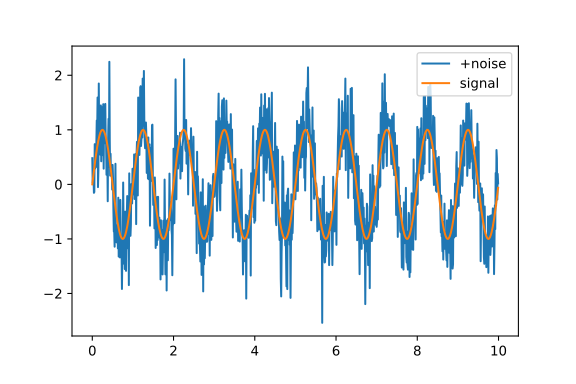
pyplot

套用標準差為 5 的高斯濾波器。 標準差越大,結果越平滑,但與原始訊號的偏差也越大。

y = gaussian_filter1d(x, 5)
plt.plot(t, y, label="filtered")
plt.plot(t, s, label="signal")
plt.legend(loc=1)
plt.show()
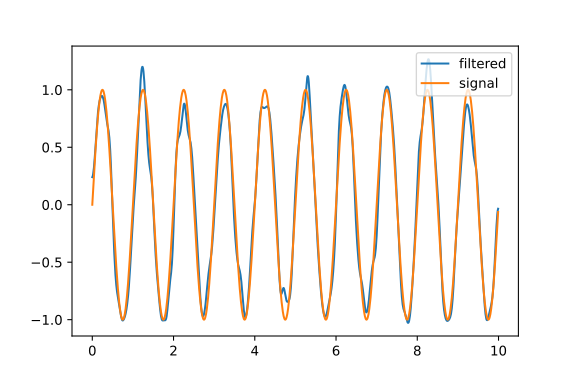

pyplot

安裝與設定 Pyenv

  1. 複製 Pyenv 複製 Pyenv 的儲存庫。 建議的目錄為 ~/.pyenv。

git clone https://github.com/pyenv/pyenv ~/.pyenv


0. 編譯 Bash 擴充功能以提升速度
可以編譯 Bash 擴充功能來提升效能。
即使編譯失敗,仍可正常運作。

```sh
cd ~/.pyenv && src/configure && make -C src
  1. 設定(bash) 路徑及其他設定。

echo 'export PYENV_ROOT="$HOME/.pyenv"' >> ~/.profile echo 'export PATH="$PYENV_ROOT/bin:$PATH"' >> ~/.profile echo 'eval "$(pyenv init --path)"' >> ~/.profile export PYENV_ROOT="$HOME/.pyenv" export PATH="$PYENV_ROOT/bin:$PATH" eval "$(pyenv init --path)" echo -e 'if shopt -q login_shell; then'
'\n export PYENV_ROOT="$HOME/.pyenv"'
'\n export PATH="$PYENV_ROOT/bin:$PATH"'
'\n eval "$(pyenv init --path)"'
'\nfi' >> /.bashrc echo -e 'if [ -z "$BASH_VERSION" ]; then'
'\n export PYENV_ROOT="$HOME/.pyenv"'
'\n export PATH="$PYENV_ROOT/bin:$PATH"'
'\n eval "$(pyenv init --path)"'
'\nfi' >>
/.profile


# 安裝 Python 環境

## 安裝相依套件
```sh
sudo apt-get update; sudo apt-get install make build-essential libssl-dev zlib1g-dev \
libbz2-dev libreadline-dev libsqlite3-dev wget curl llvm \
libncurses-dev xz-utils tk-dev libxml2-dev libxmlsec1-dev libffi-dev liblemgma-dev -y

查看可安裝的環境​

pyenv install -l

安裝​

編譯需要一些時間,請耐心等候。

CONFIGURE_OPTS= "--enable-shared" pyenv install 3.9.5

確認版本​

pyenv versions

切換版本​

pyenv global 3.9.5

使用 Numo::NArray 計算點積

require "numo/narray"

實數向量的點積​

a = Numo::NArray[4, -1, 2]
b = [2, -2, -1]
c = a.dot b
8

複數向量的點積​

a = Numo::NArray[1+1i, 1-1i, -1+1i, -1-1i]
b = [3-4i, 6-2i, 1+2i, 4+3i]
c = a.conj.dot b
(1.0-5.0i)

複數與自身的點積​

d = a.conj.dot a
(8.0+0.0i)

矩陣的點積​

a = Numo::NArray[[1, 2, 3], [4, 5, 6], [7, 8, 9]]
b = [[9, 8, 7], [6, 5, 4], [3, 2, 1]]
c = (a * b).sum(0)
Numo::Int64#shape=[3]
[54, 57, 54]

以行向量計算點積​

c = Numo::NArray[(a * b).sum(1)].transpose
Numo::Int64(view)#shape=[3,1]
[[46],
[73],
[46]]

era.js

我建立了一個可在 JavaScript 中使用的日本年號(和暦)函式庫。

https://himeyama.github.io/era.js/era.js

let date = new Era()
date.getWareki() // "令和X年X月X日" (今日的日期)

date = new Era("2020-1-1")
date.getWareki() // "令和2年1月1日"

date.getWareki("西暦") // "2020/01/01"

date.getDateAry() // ["令和", 2, 1, 1]

Era.date2wareki(id) // 指定 id 將元素轉換為日本年號

getWareki() 的參數​

calshorttype顯示
"和暦"true0
1
2
3
4
5
false0
1
2
3
"西暦"true0
1
2
3
4
5
false0
1
2
3
4

JavaScript 筆記

帶索引的 for 迴圈​

for([i, e] of ["a", "b", "c"].entries()){
console.log(i, e)
}

也可以用 forEach​

["a", "b", "c"].forEach((e, i) => {
console.log(e, i)
})

建立長度為 n 的陣列​

const n = 10
let ary = [...Array(n)].map((_, i) => i)
// 或者
ary = Array.from({length: n}).map((_, i)=> i)

陣列求和​

let ary = [1, 2, 3, 4, 5]
ary.reduce((_, v) => _ + v)

如何製作圖示(.ico)

  1. 建立圖示。

    如何建立圖示

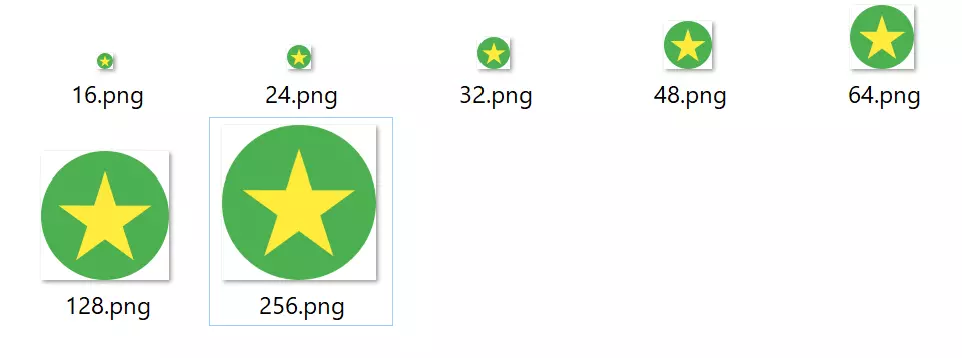
  2. 準備七張尺寸分別為 16、24、32、48、64、128 和 256 的 PNG 圖片。 如何建立圖示

  3. 使用 convert 指令建立圖示。 如何建立圖示

convert *.png favicon.ico

建立 Electron 應用程式

建立工作目錄​

mkdir test-electron-app
cd test-electron-app

建立 package.json​

npm init -y

安裝 electron​

npm i --save-dev electron

建立 index.js​

const { app, BrowserWindow } = require("electron")
const path = require("path")

function createWindow() {
const win = new BrowserWindow({
width: 800,
height: 600,
webPreferences: {
preload: path.join(__dirname, "preload.js")
}
})

win.loadFile("index.html")
}

app.whenReady().then(() => {
createWindow()

app.on("activate", () => {
if (BrowserWindow.getAllWindows().length === 0) {
createWindow()
}
})
})

app.on("window-all-closed", () => {
if (process.platform !== "darwin") {
app.quit()
}
})

建立 index.html​

<!DOCTYPE html>
<html>
<head>
<meta charset="UTF-8">
<title>Hello World!</title>
<meta http-equiv="Content-Security-Policy" content="script-src 'self' 'unsafe-inline';" />
</head>
<body style="background: white;">
<h1>Hello World!</h1>
<p>
We are using Node.js <span id="node-version"></span>,
Chromium <span id="chrome-version"></span>,
and Electron <span id="electron-version"></span>.
</p>
</body>
</html>

修改 package.json

修改 scripts 部分。

"scripts": {
"start": "electron ."
}

執行應用程式

npm start

如何製作 Ruby 擴充功能

這是一個以傳回 3 為範例的程式。

首先,用 C 語言撰寫原始碼。

// three.c
#include <ruby.h>

static VALUE int_three(void){
return INT2NUM(3);
}

void Init_three(void){
rb_define_singleton_method(rb_cInteger, "three", int_three, 0);
}

建立用於生成 Makefile 的腳本。

# extcof.rb
require 'mkmf'
create_makefile "three"

執行 Make

$ make

撰寫 Ruby 腳本來呼叫建立好的程式。

# main.rb
require "./three"
p Integer.three

執行

$ ruby main.rb
3